
Installation
Install STG Radio Pack on your FiveM server, add the radio, detector and jammer items to your inventory and start it.
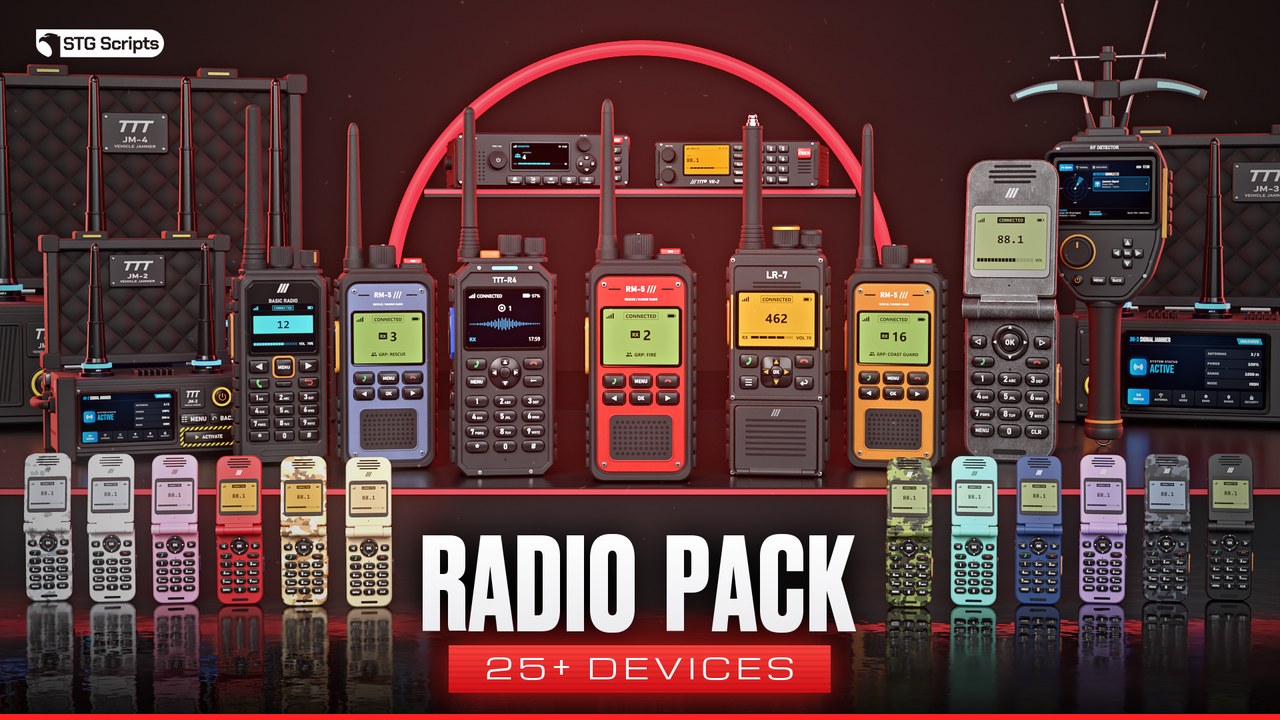
STG Radio Pack
Download the script
Sign in to the Cfx.re portal with the account you used at checkout and download stg-radiopack from Granted Assets.
Move the resource
Extract the zip and place the stg-radiopack folder inside the [STG] category folder in your resources directory.
resources/
└── [STG]/
    ├── stg_lib/
    └── stg-radiopack/
Install the dependencies
Radio Pack needs ox_lib and stg_lib. Skip this step if your server already runs them.
Add the items
Pick the tab for your inventory. QBOX servers, and any ESX or QBCore server running ox_inventory, use the ox_inventory tab.
Add these entries to ox_inventory/data/items.lua:
["stg_radio_basic"] = {
    label = "Basic Radio",
    weight = 300,
    stack = false,
    close = true,
    client = {
        event = 'stg-radiopack:client:use'
    }
},
["stg_radio_flip"] = {
    label = "Flip Radio",
    weight = 250,
    stack = false,
    close = true,
    client = {
        event = 'stg-radiopack:client:use'
    }
},
["stg_radio_tactical"] = {
    label = "LR-7 Tactical Radio",
    weight = 350,
    stack = false,
    close = true,
    client = {
        event = 'stg-radiopack:client:use'
    }
},
["stg_radio_duty"] = {
    label = "R4 Duty Radio",
    weight = 350,
    stack = false,
    close = true,
    client = {
        event = 'stg-radiopack:client:use'
    }
},
["stg_radio_rescue_red"] = {
    label = "RM-5 Rescue Radio Red",
    weight = 350,
    stack = false,
    close = true,
    client = {
        event = 'stg-radiopack:client:use'
    }
},
["stg_radio_rescue_orange"] = {
    label = "RM-5 Rescue Radio Orange",
    weight = 350,
    stack = false,
    close = true,
    client = {
        event = 'stg-radiopack:client:use'
    }
},
["stg_radio_rescue_navy"] = {
    label = "RM-5 Rescue Radio Navy",
    weight = 350,
    stack = false,
    close = true,
    client = {
        event = 'stg-radiopack:client:use'
    }
},
["stg_radio_detector"] = {
    label = "RF Jammer Detector",
    weight = 900,
    stack = false,
    close = true,
    client = {
        event = 'stg-radiopack:client:use'
    }
},
["stg_jammer_small"] = {
    label = "JM-2 Compact Jammer",
    weight = 6000,
    stack = false,
    close = true,
    client = {
        event = 'stg-radiopack:client:use'
    }
},
["stg_jammer_medium"] = {
    label = "JM-3 Vehicle Jammer",
    weight = 9000,
    stack = false,
    close = true,
    client = {
        event = 'stg-radiopack:client:use'
    }
},
["stg_jammer_large"] = {
    label = "JM-4 Heavy Jammer",
    weight = 14000,
    stack = false,
    close = true,
    client = {
        event = 'stg-radiopack:client:use'
    }
},
Add these lines to QBShared.Items in qb-core/shared/items.lua:
stg_radio_basic = { name = 'stg_radio_basic', label = 'Basic Radio', weight = 300, type = 'item', image = 'stg_radio_basic.png', unique = true, useable = true, shouldClose = true, description = 'A simple two way radio.' },
stg_radio_flip = { name = 'stg_radio_flip', label = 'Flip Radio', weight = 250, type = 'item', image = 'stg_radio_flip.png', unique = true, useable = true, shouldClose = true, description = 'A flip radio with 13 themes.' },
stg_radio_tactical = { name = 'stg_radio_tactical', label = 'LR-7 Tactical Radio', weight = 350, type = 'item', image = 'stg_radio_tactical.png', unique = true, useable = true, shouldClose = true, description = 'A tactical radio with a telescopic antenna.' },
stg_radio_duty = { name = 'stg_radio_duty', label = 'R4 Duty Radio', weight = 350, type = 'item', image = 'stg_radio_duty.png', unique = true, useable = true, shouldClose = true, description = 'A duty radio with a color screen.' },
stg_radio_rescue_red = { name = 'stg_radio_rescue_red', label = 'RM-5 Rescue Radio Red', weight = 350, type = 'item', image = 'stg_radio_rescue_red.png', unique = true, useable = true, shouldClose = true, description = 'A rescue radio with an SOS button.' },
stg_radio_rescue_orange = { name = 'stg_radio_rescue_orange', label = 'RM-5 Rescue Radio Orange', weight = 350, type = 'item', image = 'stg_radio_rescue_orange.png', unique = true, useable = true, shouldClose = true, description = 'A rescue radio with an SOS button.' },
stg_radio_rescue_navy = { name = 'stg_radio_rescue_navy', label = 'RM-5 Rescue Radio Navy', weight = 350, type = 'item', image = 'stg_radio_rescue_navy.png', unique = true, useable = true, shouldClose = true, description = 'A rescue radio with an SOS button.' },
stg_radio_detector = { name = 'stg_radio_detector', label = 'RF Jammer Detector', weight = 900, type = 'item', image = 'stg_radio_detector.png', unique = true, useable = true, shouldClose = true, description = 'Finds active jammers nearby.' },
stg_jammer_small = { name = 'stg_jammer_small', label = 'JM-2 Compact Jammer', weight = 6000, type = 'item', image = 'stg_jammer_small.png', unique = true, useable = true, shouldClose = true, description = 'Blocks radios up to 250 m.' },
stg_jammer_medium = { name = 'stg_jammer_medium', label = 'JM-3 Vehicle Jammer', weight = 9000, type = 'item', image = 'stg_jammer_medium.png', unique = true, useable = true, shouldClose = true, description = 'Blocks radios up to 1 km.' },
stg_jammer_large = { name = 'stg_jammer_large', label = 'JM-4 Heavy Jammer', weight = 14000, type = 'item', image = 'stg_jammer_large.png', unique = true, useable = true, shouldClose = true, description = 'Blocks radios up to 5 km.' },
Run this query on your database:
INSERT INTO items (name, label)
VALUES
('stg_radio_basic', 'Basic Radio'),
('stg_radio_flip', 'Flip Radio'),
('stg_radio_tactical', 'LR-7 Tactical Radio'),
('stg_radio_duty', 'R4 Duty Radio'),
('stg_radio_rescue_red', 'RM-5 Rescue Radio Red'),
('stg_radio_rescue_orange', 'RM-5 Rescue Radio Orange'),
('stg_radio_rescue_navy', 'RM-5 Rescue Radio Navy'),
('stg_radio_detector', 'RF Jammer Detector'),
('stg_jammer_small', 'JM-2 Compact Jammer'),
('stg_jammer_medium', 'JM-3 Vehicle Jammer'),
('stg_jammer_large', 'JM-4 Heavy Jammer');
Add the item images
Copy the images from stg-radiopack/[SETUP]/item-images into your inventory's image folder, for example ox_inventory/web/images or qb-inventory/html/images.
Set your jammer PIN
Change ServerConfig.JammerPin in stg-radiopack/server/config.lua. Players never receive this file, the PIN is shown to the player who places a jammer.
Start the script
Make sure [STG] starts after your framework, your inventory and your voice script in server.cfg:
# your framework: es_extended, qb-core or qbx_core
# your inventory, for example ox_inventory
# your voice script, for example pma-voice
ensure ox_lib
ensure stg_lib
ensure [STG]
Then restart the whole server.
Stop the other radio scripts on your server. Two scripts that set the radio channel at the same time disconnect each other.
Nothing happens when you use the item? See Common Errors.
Next steps
Configuration
Keys, channels, SOS, vehicle radio and jammers
Integrations
Voice scripts, notifications and help prompts
Still having trouble?
Open a ticket on our Discord. Our team answers around 15 hours a day.
Radio Pack
3D radios for FiveM with live screens and working keys. 7 handhelds, 2 vehicle radios, 3 signal jammers, an RF detector, SOS calls and an admin panel.
Configuration
Every option in STG Radio Pack shared/config.lua, from the open key and the channels to SOS calls, the vehicle radio and the jammers.